

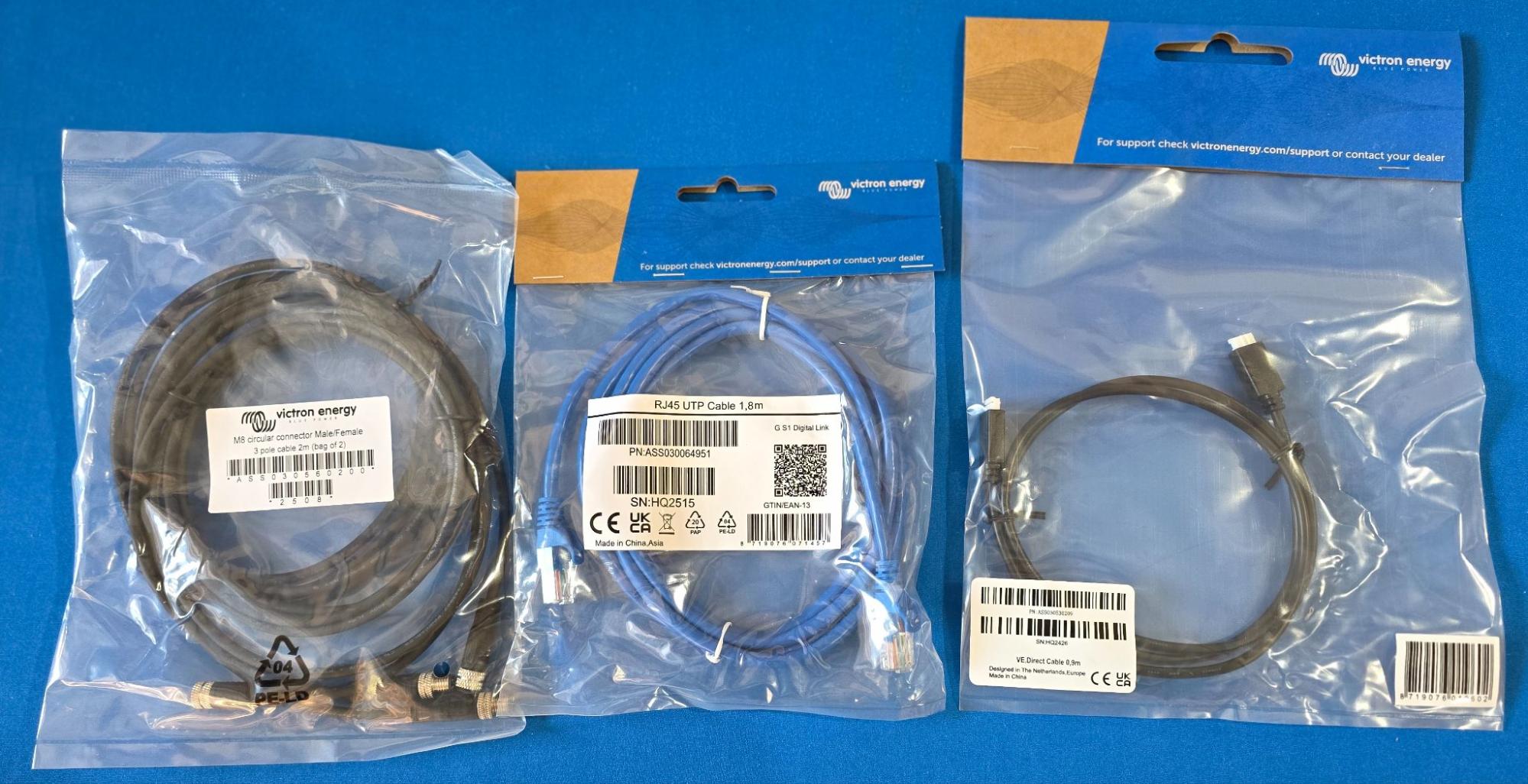
VE.Bus, VE.CAN, VE.Direct, Wakespeed, SeeLevel and more!
We hope you’re sitting down to read this blog, because this post covers the super exciting topic of communication cables! Victron Energy currently offers more than 20 different communication cables for their electrical devices, and that doesn’t include even more “cables” that Victron chooses to call “sensors”. But don’t worry, we’re not here to bore you with long descriptions of every single cable available. We’re here to bore you with just a handful of the popular cables needed for camper van electrical systems.
Cable-shaming aside, the numerous Victron electrical devices, protocols, and cables that are required for your system can be a confusing topic. And you need to have the correct cables for your system to work properly. So let’s dive in.
All of these cables (and more!) are laid out in our camper van electrical system blog posts and corresponding free example wiring diagrams. If those posts plus this blog still doesn’t make it clear, we are always happy to help so please contact us.
This guide focuses on Victron Energy system cables – the data and communication cables that let Victron components share information and work together (VE.Bus, VE.CAN, VE.Direct, and related adapters). This guide does not cover battery or inverter power cable sizing (which requires a separate fuse and wire-size approach).
Table of Contents
Here’s a list of all of the super exciting cables covered in this blog.
Keep reading for all the gory cable details. But check out this at-a-glance table to whet your cable appetite.
|
Cable type |
Device it connects to |
Typical cable quantity |
|
VE.Bus |
Multiplus |
1 |
|
VE.CAN |
Lynx Shunt Lynx BMS |
1 |
|
VE.Direct |
SmartShunt Orion XS MPPT Charge Controller |
1 per device if you have a Cerbo |
|
Battery Extension |
Lynx BMS |
1 |
|
RJ10 |
Lynx Distributor |
1 (included with Lynx Distributor) |
|
Temperature sensor |
Multiplus |
1 (included with Multiplus) |
|
Wakespeed to Victron crossover |
Wakespeed WS500 & Pro |
1 |
|
RV-C to VE.CAN adapter |
SeeLevel panel |
1 |
Victron Cable Top 3
Here are the three most-needed cables for Victron equipment in your rig.
-
VE.Bus / VE.CAN Cables are Ethernet-style cables used by higher-power and higher-speed Victron devices such as Multiplus inverter/chargers, Lynx Shunts, and Lynx Smart BMS. Cerbo GX communication centers connect to those high power/speed devices and have both VE.Bus ports and VE.CAN ports, which are connections using different protocols for different devices that confusingly but conveniently happen to share the same cable type.
-
VE.Direct Cables are proprietary cables used by lower-power and lower-cost Victron devices such as SmartShunts, Orion XS DC-DC chargers, and SmartSolar MPPT Charge Controllers. Typically, VE.Direct cables are used to connect these devices to a Cerbo GX.
-
M8 (Circular) Battery Extension Cables are used to connect Lithium Smart & NG batteries communications to an external Smart BMS.
More details about these cables are covered below. And don’t you worry, we’ll touch on a few more important cables too!
Most Victron devices have only one type of communication, therefore you only need to understand one cable per device. The main exception is the Cerbo GX communication center, which supports almost all of the communication & cable types in order to function as a center-of-communications. If you have a Cerbo in your system, which is highly recommended, then we suggest auditing your other Victron devices and temporarily ignoring the Cerbo itself. After all, all of those other devices will be connected to the Cerbo, and let’s not further confuse things by double-counting cables.
Lastly, if you don’t have a Cerbo GX, then you probably just need one VE.Bus / VE.CAN cable for your Multiplus inverter/charger. Keep reading for funsies, but that may be all you need to know!
VE.Bus / VE.CAN Cables
Most camper van electrical systems have a Multiplus inverter/charger, and Multiplus devices are VE.Bus products. In addition to Multiplus devices, some standalone BMS devices use VE.Bus. VE.Bus runs the Victron MK2/MK3 protocol, which is a fancy way of saying Victron uses a proprietary, serial communication protocol for their Multiplus & other VE.Bus products.
VE.CAN devices typically used in camper vans include Lynx Shunts, Lynx Smart BMS, and certain higher-powered MPPT Charge Controllers. VE.CAN runs a CAN protocol that supports a mix of Victron proprietary and 3rd party “structures”. We’ll talk about some of that 3rd party support a little bit later in Other Useful Cables.
Both the VE.Bus and VE.CAN communication ports use the same cable. We offer several of the most popular lengths of VE.Bus / VE.CAN cables in our store.

How many VE.Bus / VE.CAN cables do you need?
-
If you do not have a Cerbo in your system, the answer is likely one, which would be the number of Multiplus inverter/charger devices in your rig. You’ll still want one cable to configure and update firmware in your Multiplus even if you don’t use a Cerbo. You may also want to understand Victron dongles in that case.
-
If you do have a Cerbo, then prepare for math. This is not so tough math where the answer is typically one or two. Add up the number of Multiplus inverter/chargers, then add one more if you have a Lynx Shunt or BMS. Even if you have a ton of solar and use a MPPT with VE.CAN, those devices also have VE.Direct ports; you must use one cable or the other (not both together) on those MPPTs, and we find it easiest to stick with VE.Direct for all MPPT Charge Controllers.
Our suggestion is to buy a longer cable than you think is necessary. The cost difference between the common cable lengths is negligible. It’s best to coil up any excess cable when you’re dressing your completed system. Don’t short yourself (literally!) and make maintenance or future changes difficult. You can use off-the-shelf Ethernet cables with couplers to extend these cables, but if you do please use high quality CAT6e cables. Your critical Multiplus & BMS information relies on good quality communication, and that means you need good quality cables.
Terminators are mini-cables, and they can be confusing too. Those blue things that come in your Cerbo box that look like Ethernet connectors with no wire? That’s the terminators we’re talking about.

What do you do with the terminators?
-
Do not use terminators on the VE.Bus. Any unused VE.Bus ports on your Multiplus or on your Cerbo can remain open & unused.
-
Unused VE.CAN ports require terminators. Any unused CAN port on your Lynx Shunt or Lynx Smart BMS needs a terminator. Cerbo GX devices have two “sets” of CAN ports, one labeled VE.CAN and one labeled BMS-CAN. Any unused port in a “set” that is used needs a terminator. Hopefully a picture is worth a thousand words, and the next section makes that clear.
BONUS Cerbo GX VE.Bus and VE.CAN Connections: Explained!
We know that some of you are drifting off already. Stay frosty! If you’re going to learn about cables, it’s probably pretty important to plug the cables into the right places too. Don’t forget that all of these cables are nicely laid out in our example wiring diagrams too.
This blog is focused on the popular communication cables for Victron equipment. Those popular cable locations on the Cerbo are highlighted below. When looking at the front face of the Cerbo, there are six Ethernet-like ports in a row along the back of the device (closest to the mounting surface); these six ports are the VE.Bus and VE.CAN ports (right to left).
-
The purple box shows the two VE.Bus ports. Typically you’ll use one of the two ports for your Multiplus inverter/charger connection, and the remaining one will be empty.
-
The blue boxes show the two “sets” of two CAN ports, titled VE.CAN and BMS-CAN. These are two separate CAN buses that can be configured to use different protocols and speeds. We recommend that your Lynx Shunt or Lynx Smart BMS (and maybe your Wakespeed regulator as part of your secondary alternator system) use the VE.CAN ports. If you have additional CAN devices such as batteries with Victron communications or a SeeLevel Tank Monitoring Kit, those can use the BMS-CAN port. Remember that if you use only one of the two ports in a “set”, the remaining port in that “set” needs a terminator. If you don’t use the VE.CAN ports or the BMS-CAN ports at all, then no worries a terminator isn’t critical.

Above the VE.CAN and VE.Bus ports (closest to the pretty blue front cover and away from the mounting surface), there is another row with a bunch of different port types.
-
The red box shows the Cerbo Ethernet port. As in not Ethernet-like but really Ethernet for a connection to a Starlink or additional router. Many customers confuse this port on the top row for a VE.Bus connection.
-
The green boxes show the VE.Direct ports, and those are important for the next type of popular communication cables.
VE.Direct Cables
Victron devices with VE.Direct communication include the SmartShunts,, newer Orion XS DC-DC chargers (XS 50, XS 70, and XS 1400; unfortunately none of the previous generation Smart DC-DC chargers support VE.Direct), and almost every BlueSolar and SmartSolar MPPT Charge Controller (except some very old and low-power versions not typical in camper vans at this point). If you have upgraded from a BMV-712 Smart Battery Monitor to add a Cerbo, you will also benefit from using the VE.Direct port on the monitor.
VE.Direct is a proprietary serial interface that uses Victron-specific VE.Direct cables available in many lengths through our store.

How many VE.Direct cables do you need?
-
If you do not have a Cerbo in your system, you do not need any VE.Direct cables.
-
If you do have a Cerbo, then prepare for some more math. But this is still fingers-on-one-hand kind of math, so don’t worry. Add up the number of Orion XS DC-DC Chargers (typically one or two), then add the number of MPPT Charge Controllers (typically one or two), and then add one more if you have a SmartShunt or a BMV-712. If you counted past three, read the next paragraph. You’ll need from zero to three VE.Direct cables in a system.
Keep in mind that the Cerbo GX provides three VE.Direct ports (those green ones in the Cerbo pic above). If you have a robust system with more than three VE.Direct devices, you will need to expand your empire by using a VE.Direct to USB Interface Cable for the 4th (and even 5th?) VE.Direct device. The interface cable includes the USB end and the VE.Direct end, so you do not have to add yet another VE.Direct cable. Those additional VE.Direct devices would plug into USB ports on the Cerbo instead.
As in the VE.Bus / VE.CAN cables, our suggestion is to buy a longer VE.Direct cable than you think is necessary. It’s not practical to extend VE.Direct cables. It’s best to buy long and coil up any excess cable when you’re dressing your completed system.
M8 (Circular) Battery Extension Cables
M8 Battery Extension Cables can be used to extend the BMS communication cable pigtails that come attached to Victron Lithium Smart and NG batteries. The pigtails on the batteries are 20 in long, so in most practical camper van electronic system layouts one M8 Battery Extension Cable (pair) is required to connect your battery bank to your BMS.
M8 Battery Extension Cables come as a pair, and our store has several Battery Extension Cable length options to choose from.

How many M8 Battery Extension Cables do you need?
-
If you do not have a Victron ‘external BMS’ system using Lithium Smart or NG batteries, then you do not need any M8 Battery Extension Cables.
-
If you do have a Victron ‘external BMS’ system using Lithium Smart or NG batteries, then you likely need one M8 Battery Extension Cable (pair).
In keeping with our cable length theme, make sure that you select a long enough cable to allow for Manhattan routing and room for maintenance. A little extra coiled up cable is a wise choice.
Other Useful Cables
Here are four more cables for Victron systems worthy of a quick discussion.
1) The RJ10 cable
Yes, Victron calls it the “RJ10 cable” and nothing more, so we’re sticking with that. Every Lynx Distributor comes with a 15 inch, 4-pin cable that is essentially an old telephone cord. (Let’s just assume you’re old enough to understand that reference! If not, ignore.) The RJ10 cable allows a Lynx Shunt or Smart or NG BMS to power the Distributor LEDs and report blown fuse detection.

If you don’t have a Lynx Shunt or Smart BMS, then you do not need to use that RJ10 cable.
If you really want to see those Lynx Distributor LEDs on without a Lynx Shunt or BMS, then check out the Turning On The LED Lights On The Lynx Distributor hack at the end of this blog.
2) Temperature sensor for Multiplus or Cerbo GX
Your Multiplus inverter/charger comes with a temperature sensor (aka cable) that is typically used to measure battery temperature by attaching the ring lug to the negative post. This cable can also be used as an input to a Cerbo GX.

If you have Victron Lithium Smart or NG batteries, or if you’re using batteries with Victron communications in conjunction with DVCC, then you do not need to use the temperature sensor. For systems with internal BMS batteries without communication, using the temperature sensor with your Multiplus is a wise approach to prevent damaging your batteries in extreme temperatures.
If you misplaced (lost!) the cable that was included with your Multiplus, it is also available in our store.
3) Wakespeed to Victron Crossover Cable
If you’re using a secondary alternator system for massive charging power, you’ll likely want to include a Wakespeed to Victron Crossover Cable. This cable supports the CAN communication between your BMS (via the Cerbo) and a 3rd party device, the Wakespeed regulator.

Don’t forget that the blue end of the crossover cable plugs into your Victron equipment, and the black end of the crossover plugs into your Wakespeed regulator. A black terminator is also included, and that plugs into the unused CAN port on your Wakespeed.
The Wakespeed to Victron Crossover Cable is 4’ long, and the cable can be extended with a high-quality Ethernet cable and coupler.
4) RV-C to VE.CAN Adapter for SeeLevel
This SeeLevel Tank Monitoring Kit is a nice addition to systems with a Cerbo GX. This 3rd party kit is actually a nice addition to any system, but you won’t worry about the RV-C to VE.CAN Adapter for SeeLevel cable unless you have a Cerbo!
This cable plugs into the back of a Garnet SeeLevel 709-N2K-NLP panel and allows the RV-C protocol to plug into one of the Cerbo CAN ports (either VE.CAN or BMS-CAN, as you’ll need to change the protocol and speed as part of configuration).

RV-C uses CAN, so yes you need to use terminators. The terminator for the panel is included as part of the adapter cable, but don’t forget to use the blue terminator in any unused CAN port at your Cerbo.
The RV-C to VE.CAN Adapter for SeeLevel is 6’ long, and the cable can be extended with a high-quality Ethernet cable and coupler.
Wrap Up - Cable Selection Guide At A Glance
Whether you program your Multiplus with a dongle or through your Cerbo GX, you’ll still need a VE.Bus cable.
|
Your device |
What to buy |
|
Have a Multiplus? |
Add one VE.CAN / VE.Bus cable |
If you have a Cerbo GX, and we highly recommend that you do, follow this guide:
|
Your device |
What to buy |
|
Have a Lynx Shunt or Lynx BMS? |
Add one VE.CAN / VE.Bus cable |
|
Have a SmartShunt or BMV-712? |
Add one VE.Direct cable |
|
Have a Orion XS 50, XS70, or XS 1400 DC-DC Charger? |
Add one VE.Direct cable for each charger |
|
Have a MPPT Charge Controller? |
Add one VE.Direct cable for each controller |
|
Have a Wakespeed WS500? |
Add one Wakespeed to Victron crossover cable |
|
Have a SeeLevel Tank Monitoring Kit? |
Add one RV-C to VE.CAN adapter |
But it’s okay if you don’t have a Cerbo. You probably do not require any more communication cables.
Frequently Asked Questions
1. How many VE.Direct devices can a Cerbo support?
The Cerbo GX allows up to three VE.Direct cables to be plugged in. For additional VE.Direct devices, use a VE.Direct to USB Interface Cable instead. Those additional VE.Direct devices will use USB ports on the Cerbo.
2. Do I need terminators for VE.CAN?
Plug terminators into unused CAN ports. Use blue terminators on unused Victron VE.CAN ports. Use black terminators on unused Wakespeed CAN ports. Do not use terminators on unused VE.Bus ports.
3. What is the difference between VE.Bus and VE.CAN?
VE.Bus and VE.CAN are both communications protocols, but the protocols use different technologies and are supported by different types of products. Multiplus inverter/chargers are VE.Bus products. Lynx Shunts and BMS use VE.CAN. Both VE.Bus and VE.CAN use the same cables.
4. What is the difference between VE.Bus and VE.Direct?
VE.Bus and VE.Direct are both communication protocols, however they use different cables and work on different devices. VE.Bus units are typically high-power devices like Multiplus inverter/chargers. VE.Direct units are typically lower power devices such as DC-DC chargers and MPPT Charge Controllers.
5. Can I extend Victron cables?
VE.Bus / VE.CAN cables, a Wakespeed to Victron Crossover Cable, and a RV-C to VE.CAN Adapter for SeeLevel can all be extended using high quality Ethernet cables and couplers. It is not practical to extend VE.Direct cables - buy a longer cable.
Additional Resources
Victron Cables product information
Victron Data Communication white pape
Secondary Alternator Example Power System
Accurate Tank Monitoring with a Cerbo GX and SeeLeve


