

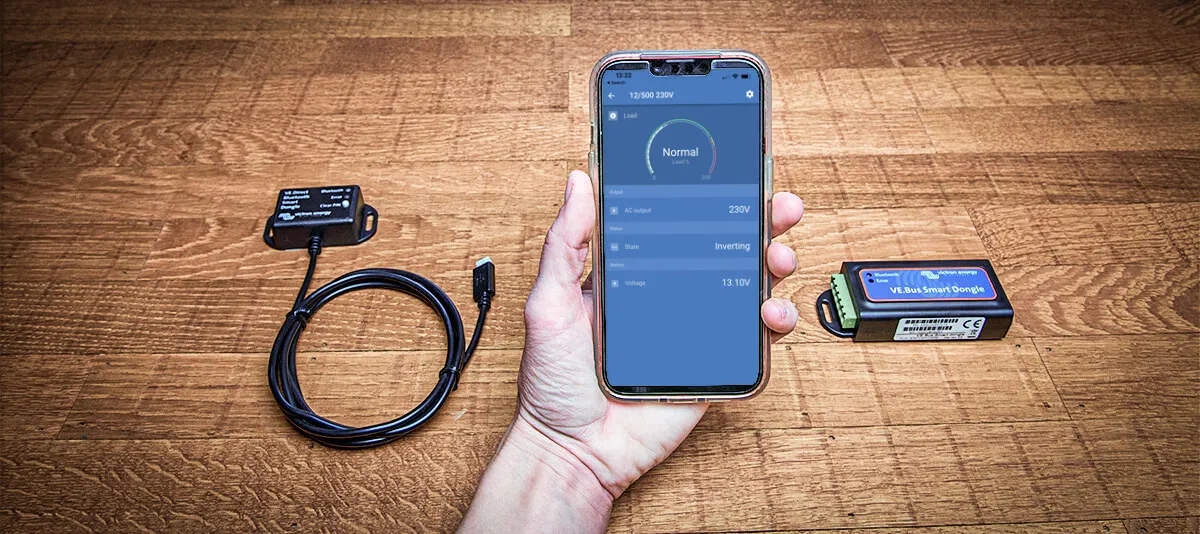
Interface MK3 to USB, VE.Bus Smart, and VE.Direct Bluetooth Smart
What is a dongle and when do I need one? This post explains Victron Energy’s confusing accessories for configuring and monitoring Victron systems.
First, let’s get this out of the way. A dongle is a small device able to be connected to and used with a computer. Sometimes Victron calls it a dongle. Sometimes Victron calls it an interface. We dunno, but we’ll call it a dongle if you call us asking for more info on our Victron products.
Types of Dongles
Victron offers several dongles for different purposes and products. If you need to configure settings, update firmware, or remotely monitor your Victron device with VictronConnect, keep reading!
As of this posting (early 2026), our store has three types of Victron Energy dongles available. Most camper van electrical systems are interested in the first two of these dongles below, while some customers upgrading older non-Bluetooth devices may be considering the third dongle. Let’s break them down.
-
An Interface MK3 to USB (we’ll call it a MK3-USB dongle!) is used to configure settings and update firmware for VE.Bus products. VE.Bus products are Multiplus inverter/chargers, standalone BMS, and some inverters. There are two MK3-USB dongle options, with the only difference between the two being a USB-A connector (the O.G. rectangular USB connection) versus a USB-C connector (the newer, slimmer port as found on phones, tablets, etc.).
-
A VE.Bus Smart Dongle is used to monitor and operate VE.Bus products via Bluetooth. “Operate” means changing the input current limit as well as switching between Off, On and Charger-only modes on an inverter/charger.
-
A VE.Direct Bluetooth Smart Dongle adds a Bluetooth interface to monitor devices such as the BMV-70x series battery monitors (not the newer BMV-712 with integrated Bluetooth), Phoenix Inverters with VE.Direct port, and MPPT Solar Charge Controllers without Bluetooth.
Don’t confuse VE.Bus devices with VE.Direct devices. VE.Bus units are typically high-power devices like Multiplus inverter/chargers, and these devices use an “Ethernet” VE.Bus cable. VE.Direct units are typically lower power devices such as DC-DC chargers and MPPT Charge Controllers, and these devices use a proprietary VE.Direct cable. Each of those device types needs a different dongle.
What’s up with all these Victron protocols and cables? Check out our Victron Energy Cables: Explained! blog.
When do I need a MK3-USB dongle?
A MK3-USB dongle (again, formally titled an Interface MK3 to USB by Victron) can be used to configure settings and update firmware on your Multiplus via the VictronConnect app. Victron still ships Multiplus products configured for AGM batteries, so most customers need to configure their inverter/chargers for lithium-ion batteries and adjust their settings as explained here.
However, if your system has a Cerbo GX command center, you can perform all of the configuration steps and firmware updates using the VRM without needing a separate MK3-USB dongle.
You have two options for configuring your Multiplus settings and updating firmware 1) with a Victron Cerbo through the VRM or 2) using a laptop/phone* directly to a MK3-USB dongle. You MUST pick one of these options.
Since you’ll need at least one dongle to configure and update your Multiplus, and maybe you want the ability to control your Multiplus remotely with a second dongle (see next section below), we highly recommend considering a Cerbo GX instead of worrying about dongles at all. You get more features, consolidated configuration & operation, plus the ability for remote troubleshooting & diagnostics for just a little more investment. Bonus tip: while we think the Cerbo pairs perfectly with a touch screen, you can use the Cerbo through VRM and/or Bluetooth without a touch screen if you choose.
If you choose to use a MK3-USB dongle for configuring your Multiplus and you do have a Cerbo in your system, don’t forget that those VE.Bus connections should be mutually exclusive. Connect the VE.Bus cable to your dongle initially, then disconnect the dongle and make the connection from the Cerbo to the Multiplus. Put your dongle in your maintenance area, as you may need it for future firmware updates.

If you need a MK3-USB dongle, your only decision is to pick between USB-A (top) and USB-C (bottom) connectors. Aside from the connector, both dongles perform the same functions. Generally speaking, laptops using VictronConnect and/or VEConfigure software trend towards USB-A ports, and newer phones & tablets using VictronConnect are using USB-C ports.
Lastly, if you’re a power user or in a big rig with multiple Multiplus devices in split-phase or parallel configurations, then you will need a MK3-USB dongle for proper configuration of the inverter/chargers.
When do I need a VE.Bus Smart Dongle?
A VE.Bus Smart Dongle adds Bluetooth connectivity to a Multiplus for monitoring and control only. You can not configure settings or perform firmware updates using a VE.Bus Smart Dongle. That’s why we talked about the MK3-USB dongle above!

Via the VictronConnect app, the VE.Bus Smart Dongle allows you to readily see an inverter/charger’s key stats as well as warnings or alarms. The VE.Bus Smart Dongle also allows you to control the input current limit and mode (Off, On aka Inverter/Charger, and Charger-only). These operator controls provide a way to replace a Digital Multi Control Panel with Bluetooth connectivity.
The VE.Bus Smart Dongle is an optional device that can add Multiplus monitoring & operation in a system without a Cerbo.
The VE.Bus Smart Dongle connects to a device with a VE.Bus cable that is not included.
When do I need a VE.Direct Smart Dongle?
The VE.Direct Bluetooth Smart Dongle adds Bluetooth connectivity to VE.Direct devices for monitoring only. Don’t confuse the VE.Bus Smart Dongle for VE.Bus devices such as a Multiplus with this one, which is for VE.Direct devices such as BMV-70x series battery monitors, Phoenix Inverters with VE.Direct port, and BlueSolar MPPT Solar Charge Controllers without Bluetooth. If you have a SmartSolar MPPT Solar Charge Controller like the ones in our store, those pretty blue boxes already have Bluetooth capability without the need for this extra dongle.

Via the VictronConnect app, the VE.Direct Smart Dongle allows you to readily see a device’s key stats as well as warnings or alarms.
The VE.Direct Smart Dongle is an optional device that can add remote monitoring to VE.Direct devices that lack Bluetooth connectivity.
The VE.Direct Smart Dongle has an integral cable that plugs directly into a single device with a VE.Direct port.
Wrap Up - Quick Selection Guide
Here it is in a nutshell:
|
Your device & goal |
What to buy |
|
Have a Cerbo GX? |
You likely don’t need a dongle |
|
Configuring or updating a MultiPlus |
MK3-USB and a VE.Bus cable |
|
Bluetooth monitoring for MultiPlus |
|
|
Bluetooth for older VE.Direct devices |
Remember to “match the port”. Use a VE.Bus dongle for Multiplus. Use a VE.Direct dongle for most other devices with a VE.Direct port.
Frequently Asked Questions
1. What software do I need to connect to a dongle?
All Victron dongles require the VictronConnect app.
* Note that Apple iPhone/iPad doesn't support USB OTG, so Bluetooth connections work fine from an iDevice but the MK3-USB dongle requires either a Windows/Mac laptop or an Android device.
2. VictronConnect won’t connect - what should I try first?
Troubleshoot common VictronConnect and Bluetooth issues in three steps.
-
Make sure the Bluetooth is on in your phone’s system menu
-
Move your phone very close to the device
-
If you’re still not connecting, then 1) close VictronConnect 2) remove the device pairing from you phone’s Bluetooth system menu 3) open VictronConnect and pair with the device from within the VictronConnect Local screen.
3. Do I need to configure my Victron electrical system?
Yes. Factory defaults are not correct for lithium-ion batteries and most camper van electrical systems. You need to configure the settings in all of your electrical devices, and you need the capability to update firmware when necessary.
4. How do I choose between a USB-A dongle and a USB-C dongle?
The only difference between the USB-A dongle and the USB-C dongle is the connection to your laptop or phone. Select USB-A for the traditional USB connector, or select USB-C for more modern devices with only USB-C ports. There are also adapters available to readily switch between the two physical connectors.
5. What is the difference between VE.Bus and VE.Direct?
VE.Bus and VE.Direct are both communication protocols, however they use different cables and work on different devices. VE.Bus units are typically high-power devices like Multiplus inverter/chargers. VE.Direct units are typically lower power devices such as DC-DC chargers and MPPT Charge Controllers.
Additional Resources
Victron Accessories product information


