

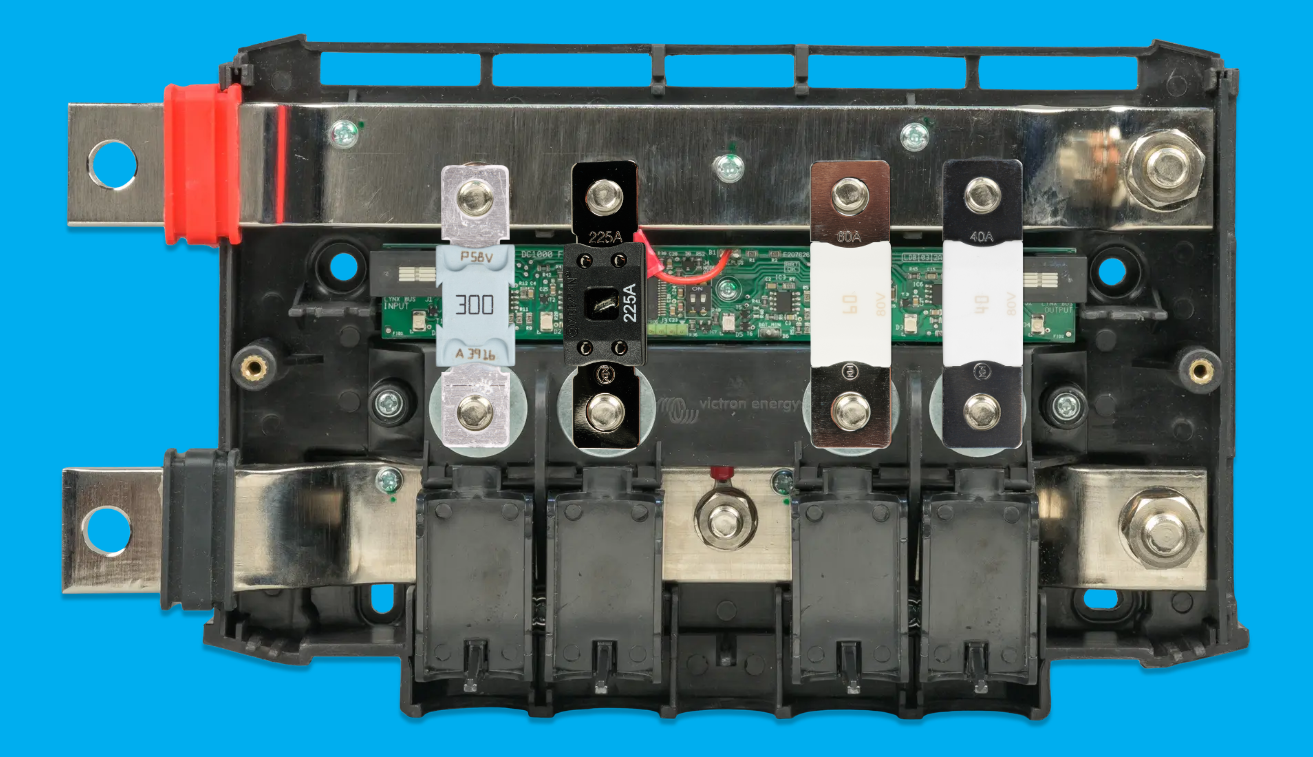
The Victron Energy Lynx Distributor is a really convenient device that provides both positive and negative bus bars, along with four fuse locations for power distribution to your chargers and loads. The Lynx Distributor uses Mega fuses, but the right fuse size depends on the specific device in your electrical system. In this short guide, we provide a quick reference for manufacturer-recommended Lynx Distributor fuse sizes for common components like Victron MultiPlus inverter/chargers, Orion DC/DC chargers, MPPT charge controllers, Wakespeed alternator setups, and load centers. We recommend a Lynx Distributor as part of your camper van electrical system in all of our free example wiring diagrams, whether or not your system includes other Victron Lynx devices.
This blog is short and sweet – keep reading for a quick reference guide to choosing fuses for your Lynx Distributor, This guide applies to both M8 and M10 Lynx versions that use the same Mega fuses.
How To Choose The Right Lynx Distributor Fuse Size
The Lynx Distributor uses Mega fuses. Mega fuses support fuse ratings from 40 Amps up to 500 Amps.
Many customers contact us looking for help with Lynx Distributor fuse size selection. How do we pick fuse ratings? We read the manual! In most cases, the device manufacturer already tells you the recommended fuse size, so this guide simply pulls those recommendations into one place for quick reference. That is especially helpful for common van electrical components like inverter/chargers, DC/DC chargers, MPPT charge controllers, secondary alternators, and load centers, where fuse size can vary quite a bit by model and system voltage.
Common Fuse Sizing Mistakes
Choosing the right fuse size is not the same thing as sizing your cable. A fuse recommendation helps protect the branch circuit and connected device, but cable size still needs to be chosen based on current, cable length, voltage drop, insulation rating, and installation conditions. In other words, do not assume the fuse size automatically tells you which wire size to use. We recommend using the Blue Sea Circuit Wizard to help with cable sizing.
DC/DC chargers and MPPT charge controllers can also require a little extra attention. With many DC/DC chargers, the house battery side needs a fuse, and the vehicle battery side does too. With MPPTs, the battery-side fuse is only part of the picture, and a solar-side disconnect is often recommended as well. This chart is meant to give you a quick starting point for the Lynx Distributor side of the system, while still pointing you back to the manufacturer documentation for full installation details.
Victron Lynx Distributor Fuse Chart By Device
Use the chart below to find manufacturer-recommended Mega fuse sizes for common devices used with the Victron Lynx Distributor.
- Select the column for your system voltage.
- Match your device model exactly.
- Use the manufacturer-recommended fuse size shown.
- Confirm cable size and installation details separately.
|
Device |
System Voltage |
||
|
12 Volts |
24 Volts |
48 Volts |
|
|
Inverter/charger |
MultiPlus 12/2000/80 |
||
|
MultiPlus 12/3000/120 |
MultiPlus 24/3000/70 |
MultiPlus 48/3000/35 |
|
|
MultiPlus 48/5000/70 |
|||
|
DC/DC charger OUT House battery side fuse |
Orion-Tr Smart 12/12/30 |
||
|
Orion XS 50 |
Orion XS 1400 |
||
|
2x Orion XS 50 |
2x Orion XS 1400 |
||
|
MPPT charge controller BATT House battery side fuse |
MPPT 100/20 |
||
|
MPPT 100/30 |
|||
|
MPPT 150/35 |
|||
|
MPPT 100/50 |
|||
|
MPPT 150/60 |
|||
|
MPPT 150/70 |
|||
|
MPPT 150/85 |
|||
|
Secondary alternator |
280XP |
55XP |
51V-HPX100 |
|
Load center (12 Volts) Primary fuse to branch fuses in load center |
Direct to load center |
Orion 24/12-70 to load center |
2x Orion-Tr 48/12-30 to load center Example wiring diagram uses Littelfuse holder with 80 Amps for additional capacity. See Bonus Tips below |
Bonus Tip #1: Blown Fuse Monitoring
The Lynx Distributor has a power LED as well as four fuse status LEDs. These LEDs can help you detect blown fuses. If the Lynx Distributor is connected to a Lynx Smart BMS (using the RJ10 cable) then the fuse status can be viewed with the VictronConnect app or by using a Cerbo GX and touch screen.
If you do not use all four Mega fuse locations in your Lynx Distributor, you will see false alarms from the unused locations (because having no fuse is an “open” just like a blown fuse). We recommend installing spare Mega fuses in unused fuse locations to work around this nit.
If you don’t have a Lynx device connected to your Lynx Distributor to power the LEDs, then you may want to check out the Turning On The LED Lights On The Lynx Distributor hack in this blog.
Bonus Tip #2: Using a 5th fuse or connection with a Lynx Distributor
If you use up all four Lynx Mega fuse holders but still need another fuse location (or three), we recommend a few ways to expand.
- A MRBF Terminal Fuse Block and fuse fits nicely on the “upper right” positive stud of the Lynx Distributor. For a single extra fused branch, wire your extra charging source or load directly to the MRBF.

-
The MRBF can be expanded with a Littelfuse MIDI Fuse Holder (3 Position) which acts as a compact secondary bus bar for up to 200 Amps of maximum current with three MIDI fuse holders. MIDI fuses range from 30 Amps and up.
-
Using a short (less than 7”) cable, you can bolt a lug directly to the “upper right” positive stud and use an inline fuse holder (that comes with some devices like air conditioners), a Mega Fuse Holder, or a MIDI Fuse Holder.
Frequently Asked Questions
What fuse size should I use for a Victron Lynx Distributor?
The Lynx Distributor uses Mega fuses, but the correct fuse size depends on the specific device connected to that fused branch. In most cases, the best place to start is the device manual. This guide is meant to save you time by pulling together manufacturer-recommended fuse sizes for common devices like MultiPlus inverter/chargers, Orion DC/DC chargers, MPPT charge controllers, Wakespeed alternator setups, and load centers.
Does the Victron Lynx Distributor use Mega fuses?
Yes. The Victron Lynx Distributor uses Mega fuses for up to four positive fused connections. Mega fuses are a good fit for many camper van electrical system components because they are available in a wide range of current ratings and are commonly used for higher-current branches like inverter/chargers, chargers, and load centers.
What is the difference between Victron Lynx Distributor M8 and M10?
The main difference is the stud size on the bus bars. The M10 model uses M10 studs for interconnecting other Lynx devices or external lugs, while the M8 version uses M8 studs. For either version, the fuse connections require M8 lugs. The M10 version replaced the M8 version, so most newer systems will use M10.
Can I use a Lynx Distributor without a Lynx Smart BMS?
Yes. A Lynx Distributor can be used as a standalone set of positive and negative bus bars with four fused connections. It does not require a Lynx Smart BMS to function. That said, if you want certain LED and monitoring features to work through the broader Lynx system, you may need another Lynx device such as a Lynx Smart BMS or Lynx Shunt.
Do I need a fuse on both the input and output side of a DC/DC charger?
Yes. For DC/DC chargers, it is common for the house battery side to require a fuse and for the vehicle battery side to require one as well. The exact setup depends on the charger model and your wiring layout, so always confirm with the manufacturer documentation. This guide is intended as a quick reference, not a substitute for the installation manual.
What does a Victron Lynx Distributor do?
A Victron Lynx Distributor provides a clean way to distribute both positive and negative power in your electrical system while also giving you four fused positive connections for major devices and branches. In practical terms, it helps organize your system, reduce wiring clutter, and add overcurrent protection to important circuits like chargers, inverter/chargers, and load centers.
Do I connect both negative and positive to the Lynx Distributor?
Yes, the Lynx Distributor contains two separate bus bars. The red, top bar is for positive, and the black, bottom bar is for negative.
How do I connect a Cerbo GX to a Lynx Distributor?
A Lynx Distributor does not bolt directly to a Cerbo GX. A Lynx Shunt or Lynx Smart BMS is required to transmit data to a Cerbo GX.
Additional Resources
Learn about our systems and free example wiring diagrams
Victron Energy Lynx Distributor manual


